
💻 Payslip Studio Pro — Free Online Payslip Generator with Live Preview, Custom Branding & PDF Export
Create Professional Payslip Studio Pro Online
🧾 Overview
KingzDesigns Payslip Studio Pro
Design, customise, and download professional payslips in minutes — no software to install, no design experience needed, and no subscription required. KingzDesigns Payslip Studio Pro is a fully browser-based, enterprise-grade payslip generator that gives you complete control over every element of your pay document, from company logo and theme colour to custom earnings categories, deductions, watermarks, and background images. Whether you’re a freelancer issuing a single payslip or an HR team processing monthly salary statements, this tool handles it all.
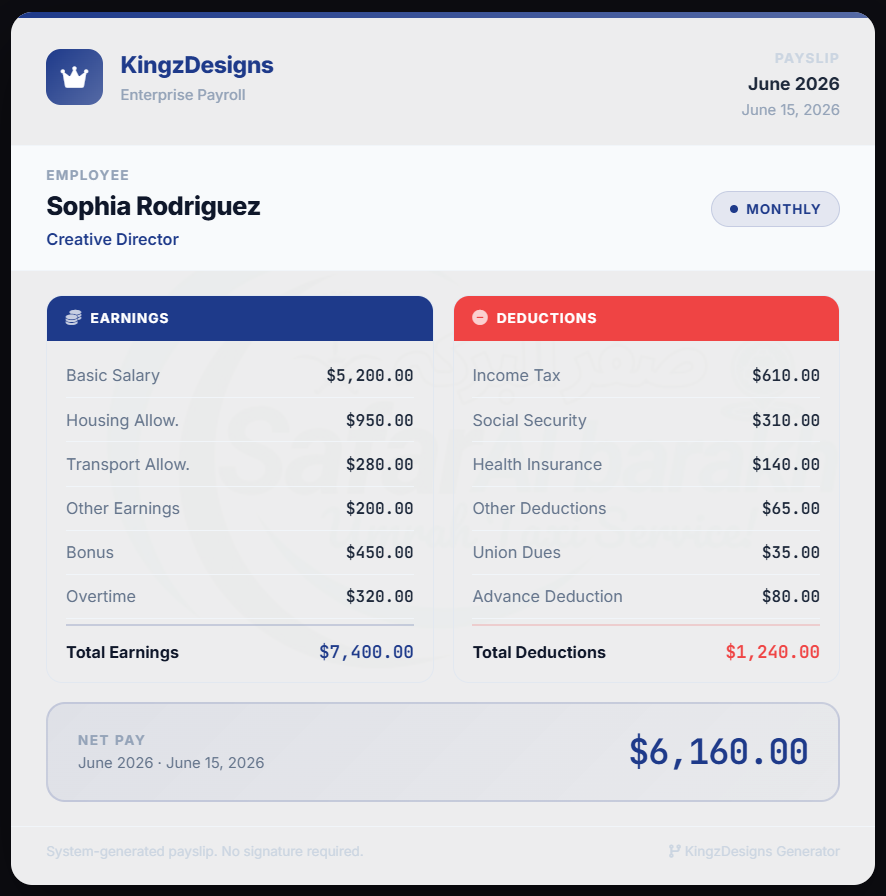
⭐ Key Features
🖥️ Live Preview — See Every Change Instantly
Every field you fill in and every setting you adjust appears on the payslip in real time. There is no need to click a refresh button to see what your payslip looks like — the preview panel updates live as you type, upload images, change colours, or add salary components. What you see on screen is exactly what will be printed or exported.
The payslip preview is displayed inside a clean, macOS-style preview window on the right side of the studio, giving you a clear, uncluttered look at your finished document while all the controls stay neatly organised on the left.
🏢 Branding & Visuals — Make Every Payslip Look Like Yours
Company Logo
Upload your own company logo and it renders directly in the header of every payslip. Any image format is supported, and the logo is automatically sized to fit the payslip header cleanly. If no logo is uploaded, a professional placeholder icon takes its place automatically.
Background Image
Upload a custom background image to give your payslip a distinctive look — ideal for companies that want their payslips to carry a watermarked company letterhead, a subtle texture, or branded imagery. Background opacity adjusts automatically so the payslip content always remains clear and readable.
Background Watermark
Add a separate watermark image that sits behind all payslip content. A dedicated opacity slider (0–100%) gives you full control over how visible the watermark appears — from barely visible at low opacity to a strong brand statement at higher levels. Transparent PNG files work best for clean watermark results.
Theme Accent Colour
Choose any colour using the built-in colour picker. The selected colour drives the payslip header bars, company name, employee designation, net pay figure, and card borders — giving every payslip a cohesive, branded look that matches your organisation’s identity.
Company Name & Slogan
Enter your company name and a one-line slogan or tagline. Both appear prominently in the payslip header alongside your logo.
Company Description
Add an optional longer description, company address, registration number, or any additional detail you want included in the payslip header area.
💼 Employee & Payroll Details — Every Field You Need
The Employee & Payroll section covers all the information a complete, professional salary slip should carry:
- Full Name — the employee’s full legal name as it should appear on the payslip
- Designation / ID — job title, position, or employee reference number
- Pay Period — the month and year this payslip covers (e.g. June 2026)
- Pay Date — the exact date of salary payment
💰 Standard Earnings — Pre-Built Salary Components
Four standard earning categories come built into the tool and are ready to fill in immediately:
- Basic Salary — the employee’s fixed base pay
- Housing Allowance — residential or accommodation supplement
- Transport Allowance — commuting or vehicle supplement
- Other Earnings — a catch-all field for any additional standard earning
All four values are included in the total earnings calculation automatically.
➕ Custom Categories — Full Flexibility for Any Payroll Structure
No two payroll structures are identical, which is why Payslip Studio Pro lets you add as many custom earning and deduction categories as your payroll requires.
Custom Earnings
Click + Earning to add any earning category with a name and amount. Common uses include:
- Bonus
- Overtime Pay
- Commission
- Performance Incentive
- Shift Allowance
- Medical Allowance
- Meal Allowance
- Internet Allowance
Custom Deductions
Click + Deduction to add any deduction category. Common uses include:
- Income Tax / PAYE
- Social Security Contribution
- Health Insurance Premium
- Provident Fund
- Loan Repayment
- Advance Recovery
- Union Dues
- Pension Contribution
Each custom category appears as a labelled line item on the payslip. Remove any field with a single click on the trash icon. All custom values feed into the earnings and deductions totals automatically.
📊 Standard Deductions — Pre-Built Deduction Lines
Four standard deduction categories come ready to use:
- Income Tax — statutory income tax or PAYE deduction
- Social Security — national insurance or social contribution
- Health Insurance — employer-provided health plan premium
- Other Deductions — a flexible field for any additional standard deduction
🧮 Automatic Calculations — Totals Done for You
Every time you enter or update a salary figure, the tool recalculates everything instantly:
- Total Earnings — sum of all standard and custom earning components
- Total Deductions — sum of all standard and custom deduction components
- Net Pay — total earnings minus total deductions, displayed prominently at the bottom of the payslip in your chosen theme colour
There is no manual maths required. Change any figure and all totals update on the spot.
💱 30+ Global Currencies Supported
Select the currency that matches your organisation’s country and payroll system. Supported currencies include:
| Currency | Symbol |
|---|---|
| US Dollar | $ |
| Euro | € |
| British Pound | £ |
| Indian Rupee | ₹ |
| Pakistani Rupee | Rs |
| UAE Dirham | AED |
| Saudi Riyal | SAR |
| Australian Dollar | A$ |
| Canadian Dollar | C$ |
| Japanese Yen | ¥ |
| South Korean Won | ₩ |
| Swiss Franc | CHF |
| Thai Baht | ฿ |
| Nigerian Naira | ₦ |
| South African Rand | R |
| Turkish Lira | ₺ |
| Bangladeshi Taka | ৳ |
| and many more… |
The selected currency symbol appears automatically in front of every monetary value across the entire payslip.
⬇️ Export & Print Options
Once your payslip is ready, you have two ways to save and use it:
- Save as PDF — download the payslip as a high-quality PDF document, formatted and ready for digital distribution or printing. Ideal for emailing to employees or archiving in HR records.
- Print — send the payslip directly to your printer with a single click. The print layout is automatically formatted to produce a clean, professional result with no UI controls visible on the printed page.
🔁 Generate / Refresh Payslip
The Generate / Refresh Payslip button at the bottom of the control panel instantly rebuilds the payslip preview with all your current settings applied. While changes update live as you type, this button is useful for confirming the final look before exporting, or for forcing a full refresh after batch changes.
💾 Browser-Based — No Installation, No Account
Payslip Studio Pro runs entirely in your web browser. There is nothing to download, no account to create, and no subscription to pay. Open the page and start building your payslip immediately.
All processing — calculations, image handling, PDF generation — happens locally in your browser. Nothing is sent to any external server.
🔒 100% Private — Your Data Never Leaves Your Browser
Your employee names, salary figures, company details, and uploaded images are processed entirely on your own device and are never uploaded or transmitted to any server. Once you close the browser tab or clear your data, everything is gone.
This makes Payslip Studio Pro safe to use with real employee salary information and fully compatible with GDPR, CCPA, and other workplace data protection regulations.
📱 Works on All Devices
The studio is fully responsive and works on desktops, laptops, and tablets. For the best experience with the live dual-panel layout — controls on the left and live preview on the right — a wider screen is recommended.
👥 Who Is This Tool For?
- HR departments and payroll teams who need to generate clean, consistent salary slips for employees every month
- Small businesses and startups that want professional payslips without the cost of payroll software
- Freelancers and self-employed individuals who need to issue payslips to themselves or contractors
- Accountants and bookkeepers managing payroll for multiple clients
- Sole traders and micro-businesses issuing salary statements to part-time or casual staff
- Schools, colleges, and NGOs processing staff salaries with limited administrative resources
- Employers in any country thanks to multi-currency support covering 30+ global currencies
✅ Why Choose KingzDesigns Payslip Studio Pro?
| Feature | What You Get |
|---|---|
| Live preview | ✅ Real-time, updates as you type |
| Company logo | ✅ Upload your own image |
| Background image | ✅ Custom with auto-opacity |
| Watermark | ✅ With adjustable opacity slider |
| Theme colour | ✅ Full colour picker |
| Company name & slogan | ✅ Fully editable |
| Company description | ✅ Optional detail field |
| Standard earnings | 4 pre-built components |
| Standard deductions | 4 pre-built components |
| Custom earnings | ✅ Add unlimited categories |
| Custom deductions | ✅ Add unlimited categories |
| Auto calculations | ✅ Totals update instantly |
| Net pay display | ✅ Prominent, theme-coloured |
| Currency support | 30+ global currencies |
| Employee details | Name, Designation, Period, Date |
| Export to PDF | ✅ High-quality, print-ready |
| Print support | ✅ Formatted print view |
| Branding watermark | ✅ Toggle on / off |
| Account required | ❌ None |
| Data stored online | ❌ Never |
| Cost | 🆓 Free |
❓ Frequently Asked Questions
Is Payslip Studio Pro really free? Yes. There are no hidden fees, no premium plans, and no subscription required. The full feature set is available at no cost.
Do I need to install any software? No. It runs entirely in your web browser. Just open it and start designing your payslip immediately.
Can I use my own company logo on the payslip? Yes. Upload any image file for your company logo and it will appear automatically in the payslip header.
How do I add a bonus or overtime to the payslip? Use the Custom Categories section. Click + Earning, enter the label (e.g. Bonus or Overtime), and enter the amount. It will appear as a line item on the payslip and be included in the total automatically.
Can I add a loan deduction or tax deduction? Yes. Click + Deduction in the Custom Categories section, enter the label and amount, and it will appear in the deductions column with the total updated instantly.
What currencies does the tool support? Over 30 currencies are supported, including USD, EUR, GBP, INR, PKR, AED, SAR, AUD, CAD, JPY, KRW, CHF, THB, NGN, and many more.
Can I export the payslip as a PDF? Yes. Click the Save as PDF button in the top bar to download a high-quality PDF of your payslip, ready for sharing or printing.
Is my employees’ salary data safe? Yes. All data stays in your browser and is never sent to any external server. Your payroll information is completely private.
Can I add a watermark to the payslip? Yes. Upload any image as a watermark and use the opacity slider to control how prominently it appears behind the payslip content.
What happens if I want to change the payslip colour to match my company branding? Use the Theme colour picker in the Branding & Visuals section. The colour you choose is applied across the payslip header, company name, net pay amount, and accent elements throughout the document.
Can I print the payslip directly from the browser? Yes. Click the Print button in the top bar and the payslip will be sent to your printer in a clean, formatted layout with no interface controls visible.
KingzDesigns builds free and premium online tools focused on productivity, design, and digital efficiency. Our mission is to make powerful, professional tools accessible to everyone — without unnecessary complexity.