
✍️ Salary Certificate Generator — Free Online Salary Certificate Maker with 8 Premium Templates
 Overview
Create a professional, ready-to-submit salary certificate in minutes — no software to install, no design skills needed, and no subscription required. KingzDesigns Salary Certificate Generator is a fully browser-based tool that lets you fill in a simple form and instantly see a polished, print-ready salary certificate update live on screen. Whether you need a certificate for a visa application, a bank loan, an embassy submission, or general employment verification, this tool produces a document that looks like it came straight from a company’s HR department — because it’s built exactly the way one would be.
⭐ Key Features
🖋️ 8 Premium Certificate Templates
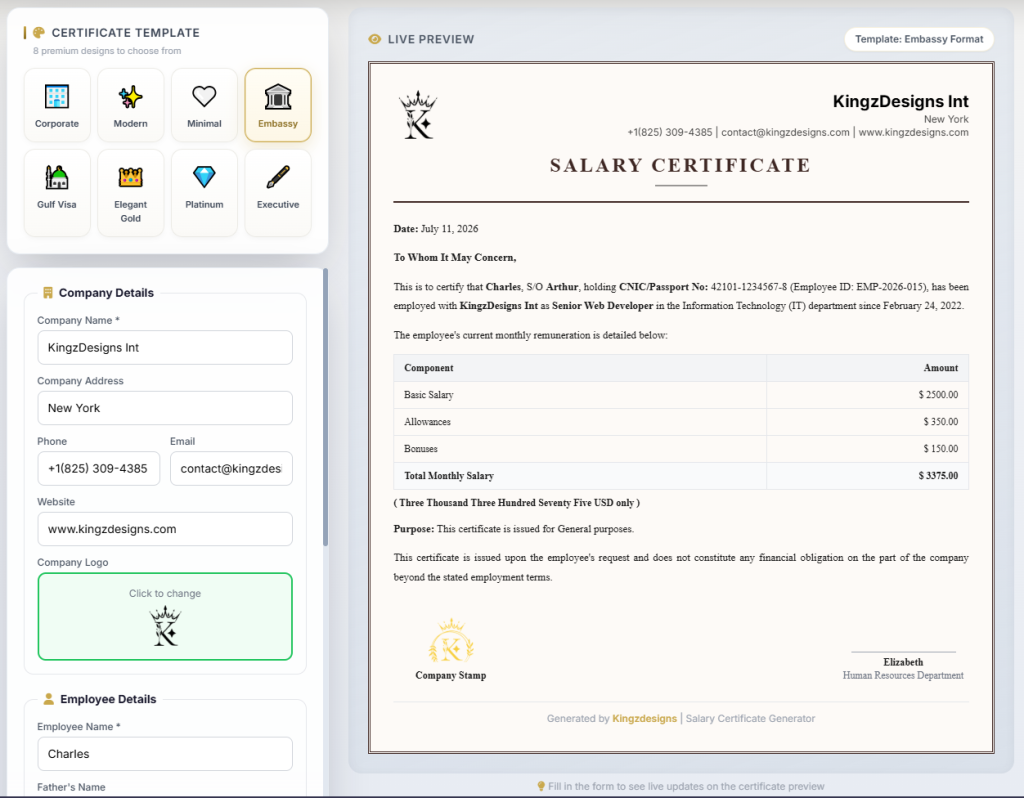
Most salary certificate tools give you one plain layout. This one gives you eight, so the certificate matches the tone of whoever is going to read it:
- 🏢 Corporate — A traditional, structured letterhead style suited to banks, government offices, and formal HR documentation.
- ✨ Modern — A clean teal header design for tech companies and modern workplaces.
- 🤍 Minimal — Stripped-back, elegant, and distraction-free.
- 🏛️ Embassy Format — A formal double-bordered layout designed to match the tone embassies expect.
- 🕌 Gulf Visa Format — A structured navy-and-white format built for Gulf-region visa and labour documentation.
- 👑 Elegant Gold — A dark, luxury certificate with gold foil borders and serif typography for a premium finish.
- 💎 Platinum — A glassmorphic silver-and-navy design with a soft gold accent glow.
- 🖋️ Executive — A formal navy-and-gold side-accent layout that reads like an official bank or corporate letter.
Switch templates any time with a single click — all your entered data carries over instantly, so you can compare styles before you decide which one to export.
🏢 Company Details
Everything needed to brand the certificate as coming from a real organisation:
- Company Name
- Company Address
- Phone Number
- Email Address
- Website
- Company Logo — upload your own logo and it renders directly in the certificate header
👤 Employee Details
All the fields a proper employment/salary certificate needs to be treated as a legitimate document:
- Employee Full Name
- Father’s Name
- CNIC / Passport Number
- Employee ID
- Designation / Job Title
- Department
- Date of Joining
💰 Salary Details — Fully Itemised & Auto-Calculated
This is where the certificate becomes more than a template — it becomes an actual salary breakdown:
- 11 supported currencies — USD, EUR, GBP, AED, SAR, PKR, INR, QAR, OMR, KWD, and BHD, each with the correct currency symbol
- Basic Salary
- Allowances
- Bonuses
- Unlimited custom salary components — add line items like Housing Allowance, Transport Allowance, or Medical Allowance, each with its own label and amount
- Auto-calculated total — the total monthly salary updates automatically as you type, or you can override it manually
- Amount in words — the total is automatically converted into written words (e.g., “Five Thousand and Fifty Cents Only”), exactly as required on formal certificates for banks and embassies
📄 Certificate Details & Purpose
Fine-tune the certificate for exactly why it’s being issued:
- Issue Date
- Purpose selector — General, Visa Application, Bank Loan, or Embassy Submission
- HR Manager Name
- Branding footer toggle — show or hide the “Generated by KingzDesigns” footer line
✍️ Signature & Stamp
Add the finishing touches that make a certificate look authentic and complete:
- HR Signature — upload a scanned or digital signature image, placed directly above the HR manager’s name
- Company Stamp — upload an official stamp image (PNG with a transparent background works best) that appears in the signature block
👁️ Live Preview, Every Keystroke
There’s no “generate and hope” step. As you fill in the form, the certificate on the right updates in real time — company details, employee information, salary table, purpose text, signature, and stamp all reflect your changes instantly, in the exact template you’ve selected.
⬇️ Export, Print & Share
Once the certificate looks right, you have several ways to use it:
- Save as PDF — download a clean, correctly formatted A4 PDF ready for printing or emailing
- Print — send the certificate directly to your printer with all editing controls automatically hidden
- Share — share a link to the tool via your device’s native share menu, or copy it to your clipboard
- Keyboard shortcut — press
Ctrl/Cmd + PorCtrl/Cmd + Sto export the PDF instantly
🔁 Reset & Start Over
One click clears every field, removes uploaded images, and resets the form back to a blank certificate — useful when you’re generating certificates for multiple employees one after another.
🔒 Private By Design
No account, no login, and no server-side storage. Everything you type and every image you upload is processed entirely inside your own browser and is never transmitted anywhere else. Once you close the tab, nothing is retained unless you’ve downloaded it.
📱 Works on Any Device
The generator is fully responsive, so it works smoothly on desktops, laptops, tablets, and phones. On smaller screens the certificate preview automatically scales down so you can still see the full layout before exporting.
👥 Who Is This Tool For?
- HR departments issuing salary certificates for employee requests
- Employees who need a salary certificate for a visa application
- Bank loan and credit card applicants who need proof of income
- Embassy and immigration submissions requiring formal employment verification
- Small business owners who don’t have a dedicated HR system but still need to issue professional documents
- Freelance HR consultants and accountants preparing documents on behalf of client companies
- Recruitment and payroll agencies generating documentation quickly for multiple clients
✅ Why Choose KingzDesigns Salary Certificate Generator?
| Feature | What You Get |
|---|---|
| Certificate templates | 8 premium designs |
| Currencies supported | 11 (USD, EUR, GBP, AED, SAR, PKR, INR, QAR, OMR, KWD, BHD) |
| Salary breakdown | Basic, allowances, bonuses + unlimited custom components |
| Auto total calculation | ✅ Live, with manual override |
| Amount in words | ✅ Automatic |
| Certificate purpose options | General, Visa, Loan, Embassy |
| Company logo | ✅ Upload your own |
| HR signature | ✅ Upload image |
| Company stamp | ✅ Upload image |
| Live preview | ✅ Updates on every keystroke |
| Export formats | PDF + direct print |
| Share option | ✅ Native share / copy link |
| Reset / start over | ✅ One click |
| Account required | ❌ None |
| Data stored online | ❌ Never |
| Cost | 🆓 Free |
❓ Frequently Asked Questions
Is this salary certificate generator free to use? Yes. There are no hidden fees, premium tiers, or subscriptions.
Do I need to install anything? No. It runs entirely in your web browser — just open the page and start filling in the form.
Can I use this certificate for a visa application? Yes. Select the “Visa Application” purpose and choose the Embassy Format, Gulf Visa Format, or Elegant Gold template for a formal look suited to visa and immigration submissions.
Does the tool calculate the total salary for me? Yes. As soon as you enter the basic salary, allowances, bonuses, or any custom components, the total is calculated automatically. You can also override it manually if needed.
Can I add allowances that aren’t listed by default? Yes. Use the “Add Component” option under Salary Details to add any number of custom salary line items with their own name and amount.
Can I add my company’s logo and stamp? Yes. Both the company logo and the company stamp can be uploaded as images and will appear directly on the certificate.
What currencies are supported? USD, EUR, GBP, AED, SAR, PKR, INR, QAR, OMR, KWD, and BHD, each displayed with the correct currency symbol.
Is my employee data safe? Yes. All information you enter and all images you upload stay in your browser and are never sent to or stored on any server.
What format can I download the certificate in? You can download it as a PDF or print it directly from your browser in a correctly formatted A4 layout.
Can I switch templates after filling in the form? Yes. All your entered information automatically carries over when you switch between any of the 8 templates, so you can compare styles before exporting.
KingzDesigns builds free and premium online tools focused on productivity, design, and digital efficiency. Our mission is to make powerful, professional tools accessible to everyone — without unnecessary complexity.