
🎴 Student ID Card Studio — Free Online Student ID Card Generator with Dual-Sided Design & Bulk Export
🧾 Overview
Design, customise, and download professional student ID cards in minutes — no software to install, no design experience required, and no subscription needed. KingzDesigns Student ID Card Studio is a fully browser-based ID card generator built specifically for schools, colleges, and universities, giving you complete control over both sides of the card — from student photo and institution logo to QR codes, barcodes, digital signatures, and official stamps. Whether you need a single card for a new student or hundreds of cards for an entire campus, this tool handles it all.
🌟 Features
🎴🎓 Dual-Sided Student ID Cards — Front & Back
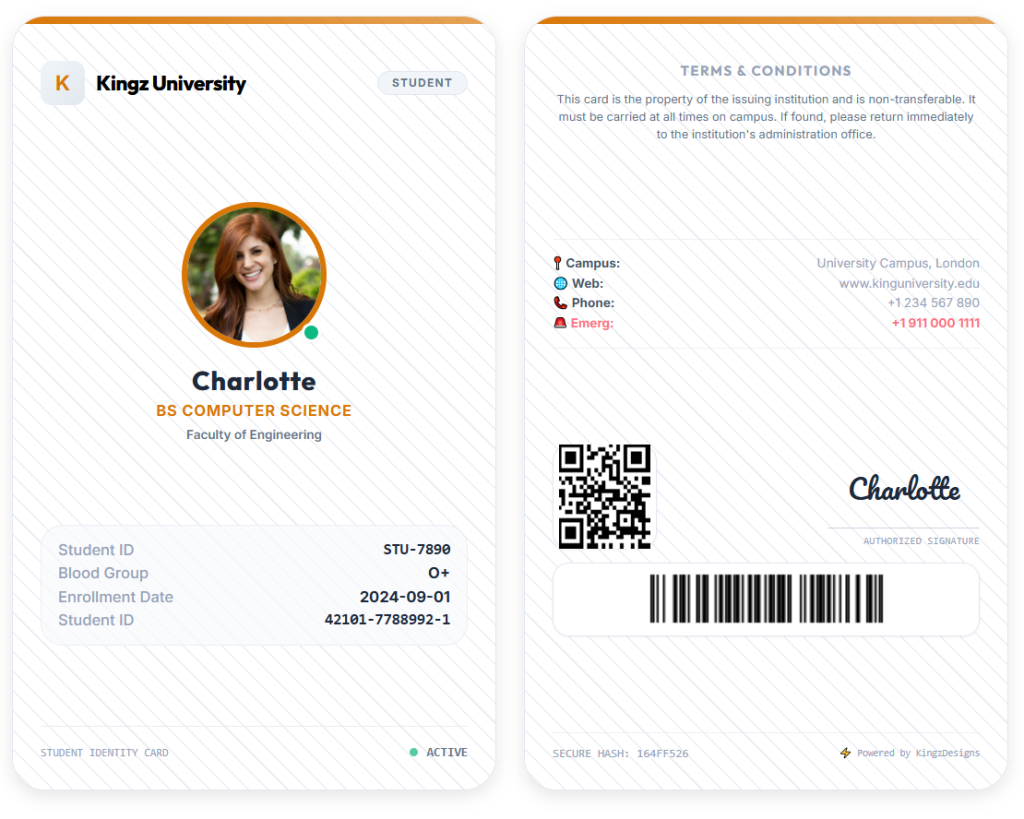
Unlike basic ID card makers, this tool generates a complete double-sided card — just like a real, physical student ID. You see both sides live in the preview panel as you work, and you can export the front only, back only, or both sides together in a single ZIP file.
The front side displays the student’s photo, name, program/course, faculty or department, student ID, blood group, and enrollment date — everything a proper student ID card needs at a glance.
The back side carries the institution’s stamp, emergency contact, campus address, identity document details, QR code, and barcode — giving the card real-world security and verification value, so it can double as a functional campus access or library card.
👤 Student Details — Every Field You Need
The Student tab covers all the information a complete student ID card should carry:
- Full Name
- Student ID
- Program / Course
- Faculty / Department
- Blood Group
- Enrollment Date
- Phone Number
- Email Address
- Campus Address
- Identity Document Type — choose from 20 document types, with Student ID selected by default, plus CNIC (Pakistan), B-Form / CRC (Pakistan), Passport, Driver’s License, Iqama Number (Saudi Arabia), Emirates ID (UAE), Aadhaar Number (India), Social Security Number (USA), Social Insurance Number (Canada), National Insurance Number (UK), Resident Permit ID, Work Permit Number, Military ID, Voter ID, and more
- Document Number
🏫 Institution Info & Branding
The Institution tab is where your school, college, or university’s identity goes on the card:
- Institution Name
- Institution Website
- Institution Address
- Emergency Contact Number
- Institution Logo — upload your own crest or logo image; it renders directly on the card
- Institution Stamp — upload an official stamp or seal image (PNG with transparent background works best) that appears on the back of the card for authenticity
🎨 Styles Tab — Full Visual Customisation
This is where you make the card look exactly the way you want it.
4 Preset Template Styles
Choose a starting point that matches your institution’s personality:
- 🏢 Corporate — Clean, structured, and professional. Ideal for universities, colleges, and formal academic institutions.
- 🌌 Modern Dark — A sleek dark-themed design for tech-focused schools, design academies, and modern campuses.
- 🌈 Creative — Bold gradients and vibrant colours for art schools, creative programs, and student clubs.
- 🖤 Minimalist — Stripped-back, elegant, and distraction-free. Suits graduate schools and professional institutes.
11 Background Patterns
Layer a subtle texture or pattern over your card background to add depth and character:
- No Pattern (Solid Colour)
- ✨ Premium Soft Gradient
- ⬛ Geometric Grid
- 〰️ Abstract Waves
- ⚬ Minimal Polka Dots
- 🔌 Circuit Board
- ⬡ Honeycomb Hexagons
- ╱ Diagonal Stripes
- ✦ Crosshatch Lines
- △ Geometric Triangles
- ◈ Carbon Fibre
- ░ Subtle Noise Texture
You can also upload your own background image and control its opacity with a slider so it sits perfectly behind your card content without overpowering it.
Colour Controls
- Theme Accent Colour — pick any colour using the colour picker or enter a hex code; this colour drives the headers, highlights, and card borders across all template styles
- Card Background Colour — independently set the base card colour
- Pattern / Overlay Colour — separately control the tint of the background pattern
Orientation
Switch between Portrait (350×530px) and Landscape (530×350px) card layouts with a single click — plus an option to show or hide the “Powered by KingzDesigns” branding line.
✍️ Signature & Verification Codes Tab
This tab adds the finishing security and authenticity features that turn a basic design into a proper, trusted student ID card.
Digital Signatures — 2 Methods
Type your signature — enter any name (e.g. registrar or principal) and choose from 12 professional signature fonts, each with a distinct handwritten style:
| Font | Style |
|---|---|
| Playball | Classic Cursive |
| Caveat | Modern Handdrawn |
| Sacramento | Slim Elegant |
| Playfair Display | Formal Monogram |
| Dancing Script | Flowing |
| Great Vibes | Luxe Signature |
| Pacifico | Friendly Bold |
| Alex Brush | Thin Signature |
| Tangerine | Brittany Style |
| Pinyon Script | Calligraphy |
| Mr De Haviland | Amsterdam Style |
| Euphoria Script | Autography |
Upload a signature image — if you already have a scanned or digital signature (e.g. from the registrar’s office), upload it as a PNG (transparent background recommended) and it will be placed directly on the card.
QR Code
Enable or disable a fully scannable QR code on the back of the card. By default it encodes the student’s ID and name. You can override this with any custom data — a student portal link, profile URL, or emergency contact info.
Barcode
Enable or disable a Code-128 barcode that auto-generates from the Student ID by default. You can provide custom barcode data for any purpose, such as library or attendance systems.
📁 Bulk Generation — Create Hundreds of Cards at Once
The Bulk Upload tab is the tool’s most powerful feature for school and university administrators.
Upload a CSV or Excel (.xlsx / .xls) file containing your student database. The tool reads each row, generates both sides of each student’s ID card automatically, and packages every card as a set of PNG images inside a single downloadable ZIP file.
Supported column headers (case-insensitive): Full Name, Student ID, Program, Department, Blood Group, Phone, Email, and other matching fields.
This means you can go from a spreadsheet of an entire incoming class to a complete set of ready-to-print student ID cards in minutes — no manual editing required.
📸 Smart Photo Cropping
When you upload a student photo, a built-in cropping tool opens automatically. You can zoom, reposition, and rotate the image — left or right — then click Apply Crop to lock it in. The photo is cropped into a perfect circle, just as it should appear on a professional student ID card. No external image editor needed.
⬇️ Export & Print Options
Once your card is ready, you have multiple ways to save and use it:
- Export PNG — Front Side Only — download just the front of the card as a high-quality PNG
- Export PNG — Back Side Only — download just the back
- Export PNG — Both Sides (ZIP) — download both sides together in a ZIP archive
- Export PDF — download the card as a PDF document, ready for printing or digital distribution
- Print — send both sides of the card directly to your printer in a correctly formatted print layout, with all UI controls hidden automatically
🔁 New Card, Reset & Clone Card State
- New Card — start a fresh card design in one click
- Reset — quickly clear the current form and start over
- Clone Card State — duplicate the current card’s settings so you can quickly create a variation without starting from scratch
💾 Auto-Save — Never Lose Your Work
Every change you make is automatically saved to your browser’s local storage. If you accidentally close the tab or refresh the page, your card data is still there when you come back. No manual saving, no lost work.
🔒 100% Private — Everything Stays in Your Browser
No account. No login. No server. Your students’ data, photos, logos, and card designs are never uploaded or stored anywhere outside your own browser. Once you close the page and clear your browser data, everything is gone.
This makes the tool safe to use with real student information and fully compatible with GDPR, FERPA, CCPA, and other student data protection regulations.
📱 Works on All Devices
The studio is fully responsive and works on desktops, laptops, and tablets. For detailed design work, a larger screen is recommended to get the most out of the live dual-sided preview.
👥 Who Is This Tool For?
- Schools, colleges, and universities issuing new or replacement student ID cards
- Registrar’s offices and student affairs teams managing ID cards for large student bodies
- Coaching centres, academies, and training institutes that need professional student credentials
- Campus libraries and facilities teams issuing cards with barcodes and QR codes for access control
- Event organisers and summer programs creating temporary student or participant credentials
- Homeschool co-ops and small private schools that want professional-looking ID cards without hiring a designer
- International schools needing multiple identity document types on the card
✅ Why Choose KingzDesigns Student ID Card Studio?
| Feature | What You Get |
|---|---|
| Card sides | Front + Back (dual-sided) |
| Templates | 4 preset styles |
| Background patterns | 11 built-in patterns + custom image |
| Colour control | Accent, background, and pattern colours |
| Card orientation | Portrait and Landscape |
| Identity document types | 20 types (Student ID default) |
| Signature options | 12 typed fonts + image upload |
| QR code | ✅ Custom data supported |
| Barcode | ✅ Code-128 format |
| Institution stamp | ✅ Upload your own |
| Smart photo cropper | ✅ Built-in with rotation |
| Bulk generation | ✅ CSV / Excel → ZIP of all cards |
| Export formats | PNG (front, back, or both) + PDF |
| Print support | ✅ Formatted print view |
| Clone card state | ✅ Duplicate current design |
| Auto-save | ✅ Browser local storage |
| Account required | ❌ None |
| Data stored online | ❌ Never |
| Cost | 🆓 Free |
❓ Frequently Asked Questions
Is this tool really free? Yes. There are no hidden fees, no premium plans, and no subscription required.
Do I need to install any software? No. It runs entirely in your web browser. Just open it and start designing.
Can I use my own institution logo and stamp? Yes. Upload any image for both the institution logo and institution stamp.
How do I create cards for an entire class or school at once? Use the Bulk Upload tab. Prepare a CSV or Excel file with your student details, upload it, and download a ZIP containing all the generated card images.
What formats can I export my student ID card in? You can export as PNG (front only, back only, or both sides), as a PDF, or print directly from the browser.
Is my students’ data safe? Yes. All data stays in your browser and is never sent to any external server, making it suitable for handling sensitive student records.
Can I customise the QR code on the back? Yes. You can enter any text or URL as the QR code data — student portal links, profile pages, or any other information.
What is the best image format for the institution stamp? A PNG file with a transparent background gives the cleanest result on the card.
Will the card work if I just need one side? Yes. You can export the front or back independently, or preview and print one side at a time using the controls in the preview panel.
KingzDesigns builds free and premium online tools focused on productivity, design, and digital efficiency. Our mission is to make powerful, professional tools accessible to everyone — without unnecessary complexity.