
📊 Professional SEO Analyzer — Free Website SEO Audit Tool with Instant Reports & 38-Point Scan
 Overview
Run a complete, professional-grade SEO audit on any website in seconds — no sign-up, no credit card, and no software to install. KingzDesigns Professional SEO Analyzer crawls your site, scores it across six core categories, flags every issue holding back your rankings, and hands you a polished, shareable report you can export as a PDF, print, or send straight to a client. Whether you’re auditing your own blog or reporting to a client, this tool gives you agency-level insight in a browser tab.
🌟 Features
🔍 One-Click Website Audit
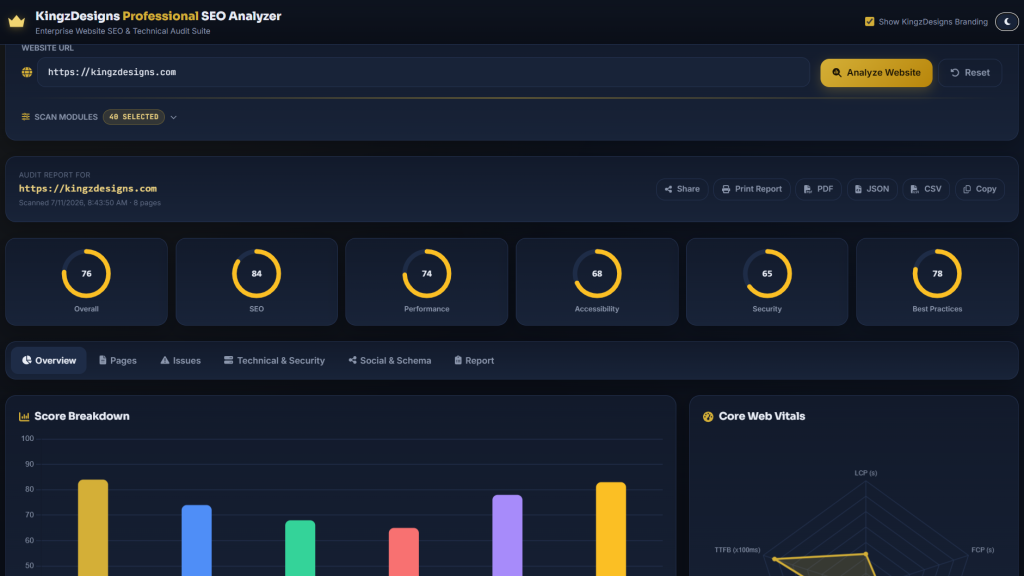
Just paste in a URL and hit Analyze Website. The tool crawls your site, checks robots.txt and sitemap.xml, scans internal pages, inspects meta tags and headings, measures Core Web Vitals, reviews security headers, and compiles everything into a live, animated report — all visible in real time as the scan progresses.
You stay in control of exactly what gets checked: choose from 38 individual scan modules, select all, select none, or pick only the checks that matter for the audit you’re running.
📊 Six Scores, One Glance
Every audit returns six clear, color-coded gauge scores so you instantly know where a site stands:
- Overall Score — the site’s combined health rating
- SEO Score — on-page and technical search optimisation
- Performance Score — speed and loading efficiency
- Accessibility Score — how usable the site is for everyone
- Security Score — HTTPS, headers, and safe browsing signals
- Best Practices Score — general web quality standards
A summary bar chart and Critical / Warning / Passed counters give you the headline numbers before you dig into a single detail.
🧭 Six Report Tabs — Every Angle Covered
Overview
Score comparison chart, Core Web Vitals chart, issue counters, and AI-style recommendation cards summarising the highest-impact fixes first.
Pages
A full table of every page the crawler found, with per-page scores you can search, filter, and drill into. Select individual pages — or all of them — and re-analyze on demand. Click any row to open a detailed page modal covering page content, metadata, keyword density, Core Web Vitals, and page-specific issues.
Issues
Every problem the scan uncovered, searchable and organised by severity — Critical, Warning, and Info — each with a plain-English explanation of what’s wrong and a clear recommendation for how to fix it.
Technical
A breakdown of technical SEO signals, security header status, and performance metrics side by side, so developers can see exactly what needs attention.
Social & Schema
Checks for Open Graph tags, Twitter Card tags, and structured data (schema markup) validity — the elements that control how a page looks when shared or featured in rich search results.
Report
A clean, print-ready summary combining the overall score, a written audit summary, critical errors, warnings, and prioritised recommendations — formatted for handing straight to a client or stakeholder.
🧪 38 SEO Checks Across 13 Categories
The analyzer inspects every layer of a website’s SEO health, including:
- On-Page SEO — title tag length, meta description length, H1 presence and hierarchy, duplicate titles/descriptions
- Images — missing alt attributes, oversized files, broken image sources
- Indexability — canonical tags, noindex/nofollow directives, robots.txt blocking
- Technical SEO — sitemap and robots.txt availability, language and charset declarations, favicon, web manifest, WWW redirects, DNS preconnect hints
- Social SEO — Open Graph and Twitter Card tags
- Structured Data — schema markup validity
- Security — HTTPS, mixed content, CSP, X-Frame-Options, cookie flags, and more
- Crawlability — 404 errors, 5xx server errors, redirect chains and loops
- URL Structure — URL length, underscores, uppercase characters, trailing slash consistency
- Links — broken internal and external links, generic anchor text
- Content — keyword stuffing, thin content, duplicate content, readability
- Mobile Friendly — viewport configuration
- Performance — compression, caching headers, render-blocking resources, unused CSS/JS, lazy loading, font optimisation
Every check comes with a pass/fail explanation and a specific, actionable recommendation — not just a red flag.
⚡ Core Web Vitals, Built In
Each audit measures and charts the metrics Google uses to judge real-world page experience — LCP, FCP, CLS, INP, and TTFB — both as a site-wide average chart and per-page in the detailed page modal, so you can see exactly which pages are dragging down performance.
🔑 Keyword Density Analysis
Every scanned page includes an automatic keyword density breakdown, showing which terms appear most often and at what percentage — useful for spotting both keyword opportunities and keyword stuffing risk.
📤 Export & Share Your Report
Once a scan completes, share or save it however you need:
- PDF — download a formatted audit report
- Print — a clean, print-optimised layout with all UI controls hidden automatically
- JSON — full structured data export for developers or other tools
- CSV — a per-page spreadsheet with URL, status, scores, word count, headings, images, broken links, and more
- Copy — copy a plain-text summary of the audit to your clipboard
- Share — copy a link, copy a summary, or share directly to WhatsApp, Facebook, LinkedIn, or email
🎨 Built-In Branding Controls
Toggle KingzDesigns branding on or off for the exported report, and switch between dark and light mode to match your working environment or presentation setting.
👥 Who Is This Tool For?
- SEO freelancers and agencies who need fast, presentable client audit reports
- Website owners and bloggers who want to check their own site’s health without paying for a subscription tool
- Digital marketers benchmarking performance, accessibility, and security alongside SEO
- Developers and webmasters who need a technical breakdown of headers, crawlability, and performance issues
- Students and marketing teams learning how professional SEO audits are structured
✅ Why Choose KingzDesigns Professional SEO Analyzer?
| Feature | What You Get |
|---|---|
| Scan modules | 38 individual checks, fully selectable |
| Score categories | Overall, SEO, Performance, Accessibility, Security, Best Practices |
| Report tabs | Overview, Pages, Issues, Technical, Social & Schema, Report |
| Core Web Vitals | ✅ LCP, FCP, CLS, INP, TTFB — site-wide and per-page |
| Keyword density | ✅ Automatic per-page breakdown |
| Multi-page crawl | ✅ Site-wide page table with search and filtering |
| Page-level detail | ✅ Modal with content, metadata, and issues per page |
| Issue explanations | ✅ Plain-English cause + fix recommendation for every check |
| Export formats | PDF, JSON, CSV, print, copy summary |
| Share options | Link, summary, WhatsApp, Facebook, LinkedIn, email |
| Branding toggle | ✅ Show/hide on exported report |
| Theme | ✅ Dark and light mode |
| Account required | ❌ None |
| Cost | 🆓 Free |
❓ Frequently Asked Questions
Is this SEO analyzer really free? Yes. There are no hidden fees, premium tiers, or subscriptions required to run a full audit.
Do I need to install anything? No. It runs entirely in your web browser — just enter a URL and click Analyze.
Can I choose exactly which SEO checks run? Yes. Use the scan options panel to select all 38 checks, none, or a custom subset before running the audit.
Does it check more than one page on my site? Yes. The crawler scans multiple internal pages and gives you a searchable, filterable table of results for each one.
Can I download or print the report? Yes. Export as PDF, print directly with a clean formatted layout, or download the raw data as JSON or CSV.
Does it check Core Web Vitals? Yes. LCP, FCP, CLS, INP, and TTFB are measured and charted both site-wide and for individual pages.
Can I share the report with a client or teammate? Yes. Use the built-in Share options to copy a link or summary, or send it directly via WhatsApp, Facebook, LinkedIn, or email.
Does the report show me exactly what’s wrong and how to fix it? Yes. Every failed check includes a plain-English explanation of the issue plus a specific recommendation to resolve it.
Can I remove the branding from the exported report? Yes. Use the branding toggle to show or hide KingzDesigns branding before exporting or printing.
KingzDesigns builds free and premium online tools focused on productivity, design, and digital efficiency. Our mission is to make powerful, professional tools accessible to everyone — without unnecessary complexity.