
⚠️ ATS Resume Checker Free Online Resume Scanner for Applicant Tracking Systems
🧾 Overview
Find out if your resume will actually make it past the robots before a human ever sees it. KingzDesigns ATS Resume Checker is a free, browser-based tool that scans your CV against any job description, scores its compatibility with Applicant Tracking Systems, and tells you exactly what to fix — missing keywords, weak sections, or formatting that gets resumes silently rejected. No sign-up, no software, no waiting.
🌟 Features
🧠 What Is an ATS — and Why This Tool Matters
Most companies today filter resumes through Applicant Tracking Software before a recruiter ever opens them. A resume that looks great to a human can still get auto-rejected because of a missing keyword, a table the parser can’t read, or a two-column layout that scrambles the text. This tool simulates that process in your browser, so you can catch and fix those problems before you hit “Apply.”
📤 Resume Upload — PDF & DOCX Supported
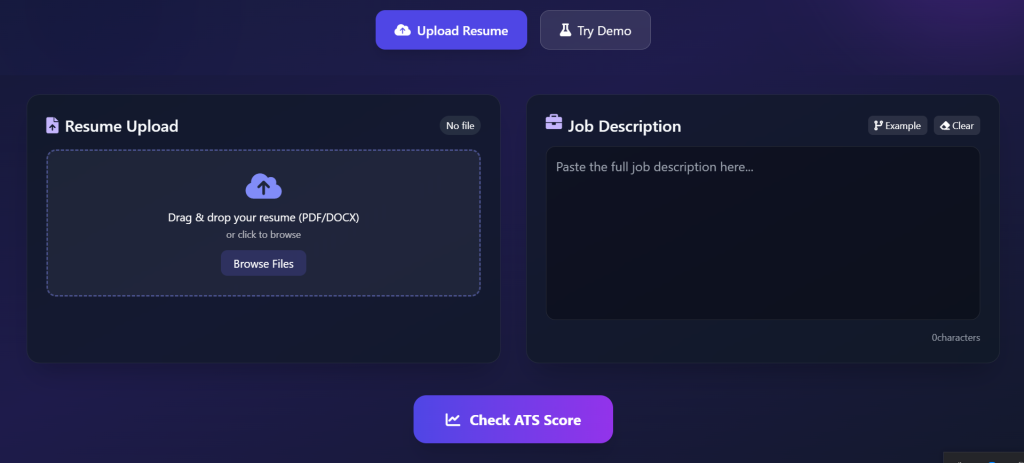
Drag and drop your resume straight into the tool, or click to browse and select a file.
- Accepts PDF and DOCX formats
- Built-in text extraction engine reads the real content of your file — no manual copy-pasting required
- Instant file status badge confirms your resume was parsed successfully
- Swap or remove your uploaded file at any time and re-analyse instantly
- Don’t have a resume handy? Load the built-in Demo Resume to see exactly how the tool works before uploading your own
💼 Job Description Matching
Paste the full job posting you’re applying to into the Job Description panel, and the tool compares it directly against your resume.
- Live character counter as you type or paste
- Example JD button to instantly load a sample job description and test the tool
- Clear button to reset the field in one click
- Works with job descriptions from any source — LinkedIn, Indeed, a company careers page, or anywhere else
🎯 Instant ATS Compatibility Score
Click Check ATS Score and get a clear, visual percentage score (0–100%) displayed in an animated circular gauge, along with a plain-language rating: Excellent, Good, or Weak.
The score is calculated from three weighted factors:
| Factor | Weight | What It Measures |
|---|---|---|
| Keyword Match | 60% | How many important terms from the job description appear in your resume |
| Section Completeness | 25% | Whether your resume contains the key sections recruiters and ATS software expect |
| Formatting Compatibility | 15% | Whether your resume’s layout is clean enough for an ATS to parse correctly |
🔑 Matched vs. Missing Keywords
The tool extracts the meaningful keywords from the job description (filtering out common filler words) and cross-checks them against your resume, then displays two clear lists:
- ✅ Matched Keywords — terms from the job description that your resume already contains
- ❌ Missing Keywords — important terms the job description uses that your resume is missing
This gives you a ready-made checklist of exactly which skills, tools, or phrases to add to improve your match rate for that specific job.
📋 Resume Section Analysis
The tool automatically scans your resume for the five sections every ATS-friendly resume should include, and flags each one as Found or Missing:
- Contact Info
- Skills
- Experience
- Education
- Certifications
If a section is missing, you’ll know immediately — before a recruiter’s software silently discards your application for looking incomplete.
🖨️ Formatting Compatibility Checker
Even a well-written resume can fail an ATS scan because of how it’s built. This tool checks for the most common formatting traps:
- 📊 Tables detected — tables often confuse ATS parsers and scramble your content
- 🖼️ Images detected — text inside images can’t be read by most ATS software at all
- 📐 Multi-column layout warning — column-based designs are a leading cause of ATS misreads
- 🤖 Overall ATS-Friendly status — a clear “Optimized” or “Needs Improvement” verdict
💡 Personalised Recommendations
Based on your score, keyword gaps, missing sections, and formatting issues, the tool generates a plain-English action list — practical, specific suggestions like which keywords to add, which sections to include, and which layout choices to avoid, so you know exactly what to fix next.
🔒 100% Private — Everything Happens in Your Browser
Your resume is never uploaded to a server. All text extraction, keyword analysis, and scoring happen locally in your browser using client-side parsing. Once you close the tab, nothing is stored or transmitted anywhere — making it safe to use with real, personal resume data.
📱 Works Anywhere, No Installation
Fully responsive and works on desktop, laptop, and tablet browsers. No downloads, no account, no plugin required — just open the page and start checking.
👥 Who Is This Tool For?
- Job seekers who want to know why their applications aren’t getting responses
- Career changers tailoring a resume to a new industry’s keywords
- Recent graduates building their first ATS-ready resume
- Recruiters and career coaches who want a quick, shareable way to review a candidate’s resume compatibility
- Anyone applying through online job portals where an ATS is almost certainly screening applications first
✅ Why Choose KingzDesigns ATS Resume Checker?
| Feature | What You Get |
|---|---|
| Supported formats | PDF, DOCX |
| Job description matching | ✅ Paste any JD, instant comparison |
| ATS score | ✅ 0–100% visual score with rating |
| Keyword analysis | ✅ Matched + missing keyword lists |
| Section analysis | ✅ Checks 5 key resume sections |
| Formatting check | ✅ Tables, images, multi-column detection |
| Recommendations | ✅ Personalised improvement tips |
| Demo mode | ✅ Try before uploading your own resume |
| Account required | ❌ None |
| Data stored online | ❌ Never — fully browser-based |
| Cost | 🆓 Free |
❓ Frequently Asked Questions
Is this ATS Resume Checker really free? Yes, completely free to use with no sign-up or subscription required.
What file formats can I upload? The tool accepts PDF and DOCX resume files.
Do I need a job description to use this tool? Yes — the score is calculated by comparing your resume against a specific job description, so paste in the posting you’re applying to for the most accurate results. You can also click “Example” to see how it works with a sample JD.
Is my resume data safe? Yes. All parsing and analysis happen directly in your browser. Your resume is never uploaded to a server or stored anywhere.
What does the ATS score actually measure? It combines how well your resume’s keywords match the job description, whether key resume sections are present, and whether your formatting is ATS-friendly (no problematic tables, images, or multi-column layouts).
Why is my score low even though my resume looks good? A low score usually means your resume is missing keywords the job description uses, is missing a standard section, or uses formatting (like tables or columns) that ATS software struggles to read correctly — even if it looks perfectly fine to a human eye.
Can I test the tool without uploading my real resume? Yes. Use the Try Demo button to load a sample resume and see exactly how the scoring and recommendations work.
KingzDesigns builds free and premium online tools focused on productivity, design, and digital efficiency. Our mission is to make powerful, professional tools accessible to everyone — without unnecessary complexity.