
🖥️ KingzDesigns CodeShare — Free Real-Time Code Collaboration Tool
 Overview
Write, edit, and debug code together with anyone, anywhere — live. KingzDesigns CodeShare is a free, browser-based collaborative code editor that lets multiple people work on the same piece of code at the same time. No downloads, no installs, and no account required to join a session. Just open the tool, share a link, and start coding together instantly.
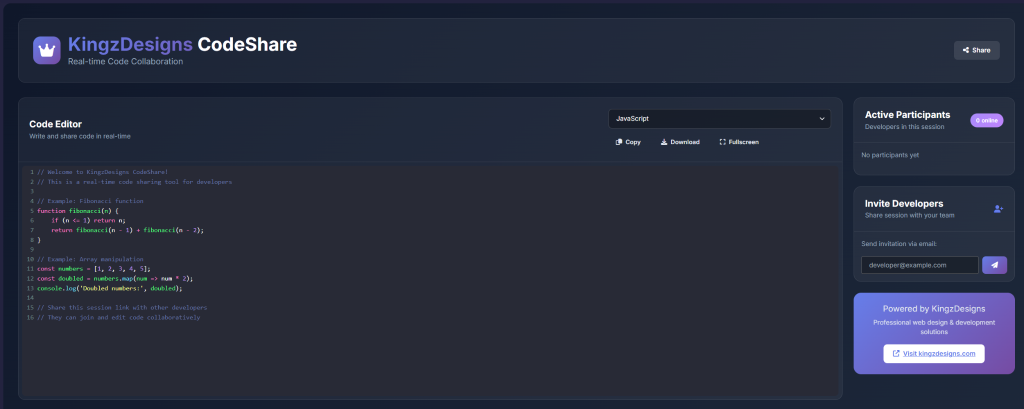
💻 Real-Time Collaborative Editing
This is a true live code editor — when you or a collaborator types, everyone in the session sees the change appear instantly. There’s no refreshing, no exporting files, and no copy-pasting code back and forth over chat or email. It feels like you’re all typing into the same document, because you are.
🌈 Supports All the Languages You Actually Use
Write code with proper syntax highlighting in:
- JavaScript
- Python
- PHP
- HTML
- CSS
- Java
- C++
Colour-coded syntax makes code easy to read and easy to follow, even when several people are editing different parts of it at once.
🔗 Start a Session and Share It in Seconds
- One-Click Session Creation — open the tool and you have a live coding session ready to use immediately
- Shareable Session Link — every session gets its own unique link; anyone with the link can join
- Email Invitations — send a clean, ready-made invitation email to bring a collaborator into your session
- Invite Multiple People at Once — bring your whole team into the same session in one go
- Share via Slack, Teams, or Direct Link — send your session wherever your collaborators already are
- See Who’s in the Session — a live participant list shows who’s currently online and active
⚙️ Control How Your Session Works
- Read-Only Mode — let some people just watch and follow along while others do the editing
- Auto-Save — your code is saved automatically as you type, so nothing is ever lost
- Line Numbers — turn line numbers on or off depending on how you like to read code
- Session Expiry — sessions can be set to stay open for anywhere from 1 hour to a full week
- Participant Limits — keep a session capped to a set number of people if you need to
🎨 A Comfortable Place to Code
- Fullscreen Mode — toggle fullscreen with one click for a distraction-free coding view, great for interviews or focused pairing
- Light & Dark Themes — switch to whichever theme is easier on your eyes
- Friendly Notifications — simple, unobtrusive alerts let you know when something happens in your session
- Works on Any Device — the editor is fully responsive, so it works just as well on a laptop, tablet, or phone
🗂️ Never Lose Your Code
- Automatic Version History — every change made during a session is tracked, so earlier versions of the code aren’t lost if something goes wrong
- Upload or Download Code — bring existing code into a session, or take a copy of the current code with you when you’re done, when this option is turned on
🔒 Private and Safe to Use
- Your code and session data stay where you’re using the tool — nothing is sent off to unrelated third-party services
- No tracking scripts or analytics are built into the editor itself
- No account or sign-up is needed to join a shared coding session
- Requests within a session are handled securely, protecting your session from common web-based attacks
This makes CodeShare a safe option even when you’re working with code you’d rather keep private.
👥 Who Is This Tool For?
- Developers who want to pair-program or debug together remotely, in real time
- Interviewers and candidates running or taking a live coding interview
- Teachers and students working through programming concepts together
- Teams who need a quick, no-signup way to collaborate on a snippet of code
- Freelancers and clients reviewing or fixing code together without extra tools
- Anyone who just needs to share and edit code with someone else, right now
✅ Why Choose KingzDesigns CodeShare?
| Feature | What You Get |
|---|---|
| Real-time collaboration | ✅ Multiple people editing at once, instantly |
| Supported languages | JavaScript, Python, PHP, HTML, CSS, Java, C++ |
| Syntax highlighting | ✅ Clean, colour-coded code |
| Session sharing | ✅ Unique link, email, Slack, Teams |
| Invite multiple people | ✅ In one go |
| Read-only mode | ✅ Control who can edit |
| Auto-save | ✅ Continuous, automatic |
| Version history | ✅ Track changes during a session |
| Session length | ✅ 1 hour up to 1 week |
| Participant limits | ✅ Configurable |
| Fullscreen mode | ✅ One click |
| Themes | Light & Dark |
| Sign-up required | ❌ None |
| Data sent to third parties | ❌ None |
| Cost | 🆓 Free |
❓ Frequently Asked Questions
Is CodeShare really free to use? Yes. There are no hidden fees or paid tiers required to use its core features.
Do I need to create an account to join a session? No. You can join a shared session using just the link, without signing up or logging in.
Which programming languages are supported? JavaScript, Python, PHP, HTML, CSS, Java, and C++ all come with full syntax highlighting.
Can I control who is allowed to edit my session? Yes. You can switch a session to read-only mode so only certain people can make changes while others simply watch.
How long does a session stay active? Sessions can be set to remain open anywhere from 1 hour up to a full week.
Is my code shared with anyone outside my session? No. Your code and session data are not sent to unrelated third-party services.
Can I invite people by email or Slack? Yes. You can send email invitations, invite several people at once, or share your session link directly through Slack or Teams.
Is there a fullscreen mode for focused coding? Yes, a single click switches to a distraction-free fullscreen view.
Will I lose my code if I close the tab by accident? No. Auto-save keeps your code saved as you type, and version history keeps track of earlier changes made during the session.
KingzDesigns builds free and premium online tools focused on productivity, design, and collaboration. Our mission is to make powerful, easy-to-use tools accessible to everyone — without unnecessary complexity.