
📄 KingzDesigns CV Builder – Free Online
🧾 Overview
The KingzDesigns CV Builder is a powerful, browser‑based tool that lets anyone create a professional, beautifully designed curriculum vitae in minutes – without registration, hidden fees, or software downloads. Whether you’re a fresh graduate, an experienced executive, or a freelancer, this tool gives you full control over your resume’s layout, content, and styling.
Create a professional, recruiter-ready CV in minutes — no sign-up, no subscription, no design skills needed. KingzDesigns CV Studio is a powerful, fully browser-based CV builder that lets you fill in your details and watch your resume come to life in real time. Whether you’re a fresh graduate landing your first job or a seasoned professional switching careers, this tool gives you everything you need to stand out.
🌟 Features
🎨 8 Professionally Designed Templates
Choose from 8 unique CV templates, each crafted for a specific industry style and hiring culture:
- Classic — A timeless two-column layout with a bold sidebar. Perfect for corporate, finance, and management roles.
- Pulse — A modern, energetic design with a gradient hero header. Ideal for marketing, media, and creative professionals.
- Crisp — A clean, minimalist single-column layout. Great for developers, writers, and anyone who values simplicity.
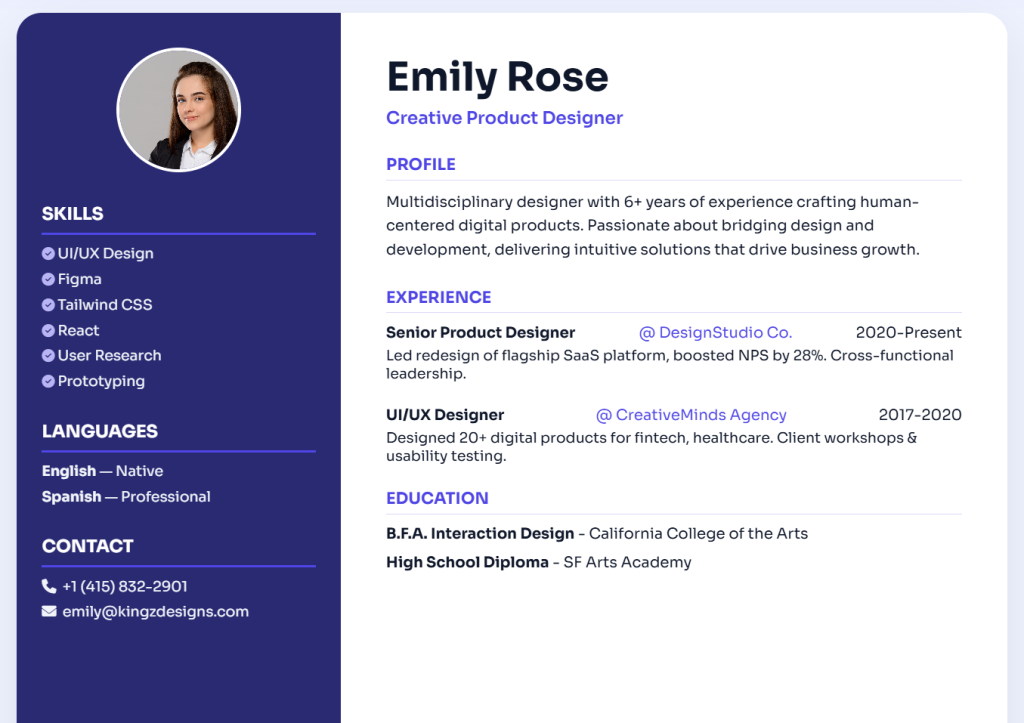
- Ember — A sleek dark-sidebar design with a light main panel. Suits tech, product, and design roles.
- Kingz — A premium, structured layout with elegant typography. Built for senior professionals and executives.
- Markus — A developer-inspired layout with a subtle side panel. Tailored for programmers, engineers, and IT specialists.
- Nurse — A clean, card-style layout with a clinical, professional feel. Designed specifically for healthcare and medical roles.
- Accountant — A structured, formal two-column design. Optimised for finance, accounting, and business professionals.
All templates are ATS-friendly (Applicant Tracking System compatible) and optimised for both digital submission and physical printing.
⚡ Live Real-Time Preview
Type your information once and see your CV update instantly as you go. No need to save, reload, or switch between tabs. The live preview panel on the right reflects every change you make on the left — so you always know exactly how your CV looks before you download it.
🖌️ Style Studio — Make It Yours
Your CV should reflect your personal brand. The built-in Style Studio gives you full control over the look and feel:
- Custom Accent Colour — Pick any colour using the colour picker to match your industry, personal brand, or preferences. The selected colour automatically applies across headings, tags, sidebars, and borders throughout the template.
- Font Selection — Switch between multiple professional font families to change the tone of your CV from modern and clean to classic and formal.
📋 All the CV Sections You Need
The builder covers every section a complete, professional CV requires:
- Personal Details — Full name, job title, email address, phone number, and physical address.
- Profile Summary — A compelling professional summary to open your CV with impact.
- Work Experience — Add unlimited roles with job title, company name, date range, and description.
- Education — Add degrees, certifications, or courses with institution name and dates.
- Skills — Enter your skills as comma-separated values and they instantly render as styled tags.
- Languages — List the languages you speak along with your proficiency level (e.g. Fluent, Intermediate, Native).
Every section is optional — build a CV that fits your specific background and the job you’re applying for.
📸 Optional Profile Photo
Optionally upload a profile photo to personalise your CV. The image is automatically cropped into a clean circle and placed in the correct position within your chosen template. You can remove it at any time with one click — useful if you’re applying in regions where photos on CVs are not recommended.
📄 Export, Print & Share
Once your CV looks exactly how you want it, you have three ways to use it:
- Export PDF — Download a high-quality, borderless PDF of your CV, ready to attach to job applications or upload to job portals.
- Print CV — Send your CV directly to your printer. The print view automatically hides all interface controls and removes rounded corners for a clean paper copy.
- Share — Use your browser’s native Share feature to send a link to this tool via email, WhatsApp, or any messaging app.
🔒 100% Private — Your Data Never Leaves Your Device
There is no account, no login, and no server involved. Everything happens entirely in your browser. Your personal information is never uploaded, stored, or processed anywhere. Once you close the tab, all data is gone — unless you have already saved your PDF.
This makes KingzDesigns CV Studio fully compliant with GDPR, CCPA, and all modern data privacy standards.
📱 Works on Any Device
Whether you’re on a desktop, laptop, tablet, or smartphone, the builder is fully responsive and works smoothly on all screen sizes. You can edit, preview, and export your CV from anywhere.
👥 Who Is This Tool For?
- Job seekers who need a polished CV quickly without installing software
- Students and fresh graduates creating their very first resume
- Career changers who need to update and reformat their existing CV
- Freelancers and consultants who regularly refresh their portfolio
- Healthcare workers, developers, accountants and other professionals who want an industry-appropriate template
- Career coaches and HR professionals looking for a free resource to share with candidates
- Website owners who want to embed a useful, no-cost tool for their visitors
✅ Why Choose KingzDesigns CV Studio?
| Feature | KingzDesigns CV Studio |
|---|---|
| Number of templates | 8 premium designs |
| Real-time preview | ✅ Yes |
| Custom accent colour | ✅ Yes |
| Font selection | ✅ Yes |
| Languages section | ✅ Yes |
| Profile photo support | ✅ Yes |
| PDF export | ✅ Yes (borderless, high quality) |
| Print support | ✅ Yes |
| ATS-compatible | ✅ Yes |
| Account required | ❌ No |
| Data stored online | ❌ No |
| Cost | 🆓 Free |
❓ Frequently Asked Questions
Is this CV builder really free? Yes, completely. There are no hidden fees, no premium tiers, and no subscription required.
Do I need to create an account? No. You can start building your CV immediately without signing up for anything.
Can I save my CV and come back to it later? The tool does not auto-save between sessions. Make sure to export your PDF before closing the page.
Will my CV pass ATS screening? Yes. All templates use clean, structured layouts that are compatible with Applicant Tracking Systems used by most employers and recruitment platforms.
Can I change the template after I’ve already filled in my details? Yes. Your information is kept as you switch between templates, so you can try all 8 designs without re-entering anything.
Is my data safe? Absolutely. All data stays in your browser. Nothing is sent to any server.
Can I use this on my phone? Yes. The tool is fully responsive and works on mobile browsers.
KingzDesigns builds free and premium online tools focused on productivity, design, and digital efficiency. Our mission is to make powerful tools accessible to everyone — without unnecessary complexity.